

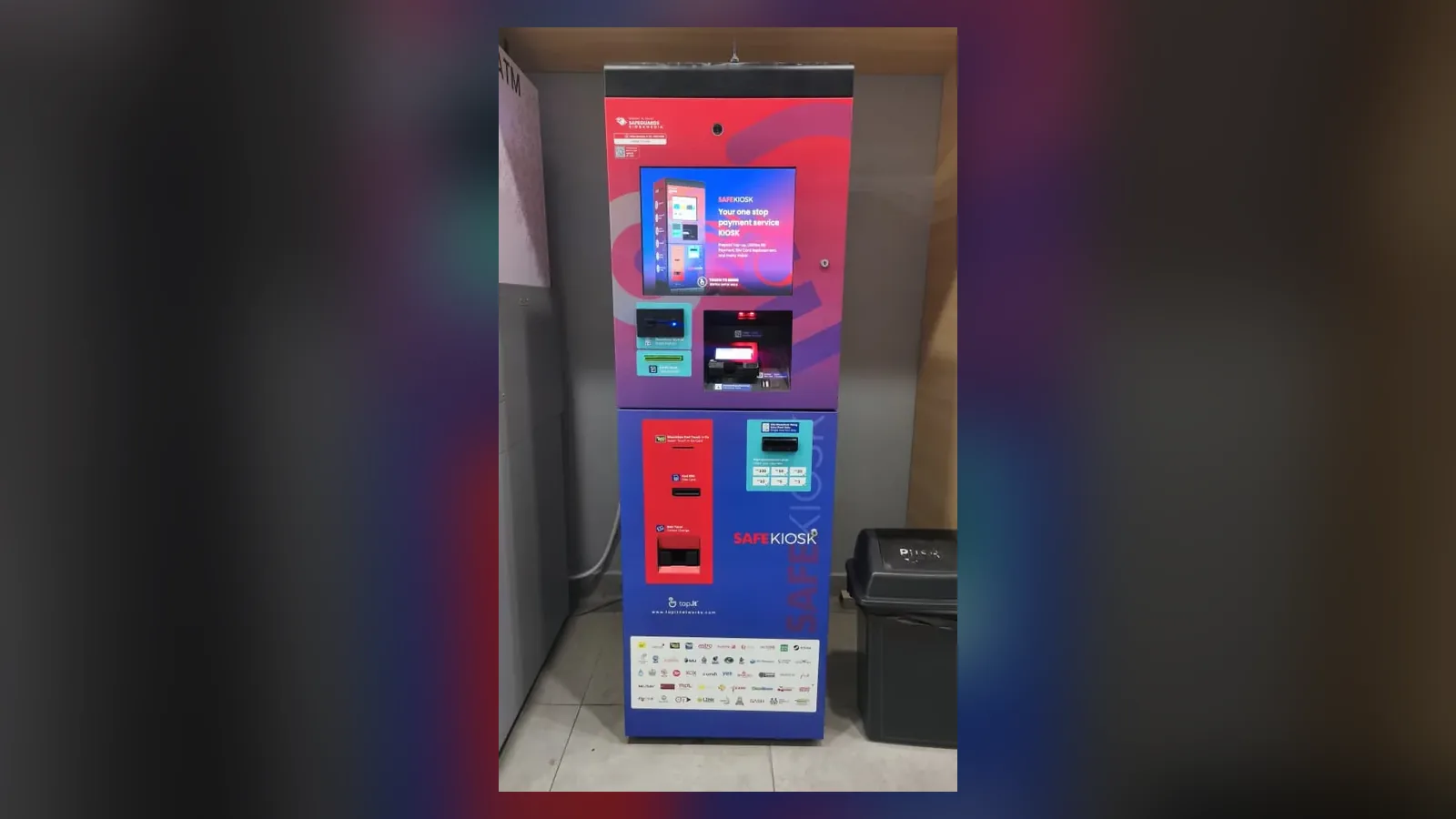
- A self-service kiosk lets customers serve themselves, for example to pay, register or order.
- On SafeKiosk, Safeguards KioskMedia lists six jobs, from bill payments to queue management and loyalty points (table below).
- Customers pay by cash, credit or debit card, or eWallet, and the kiosk runs 24/7, 365 days.
- At the locations listed as a Location with SSM Services, a SafeKiosk also handles business renewals, compound payments and SSM4U activation.
What is a self-service kiosk?
Safeguards KioskMedia runs SafeKiosk, a network of more than 400 self-service kiosks throughout Malaysia.
Wikipedia's entry on self-service describes it as a system whereby customers acquire (or serve) themselves goods or services, paying for the items at a point-of-sale, as opposed to a shop assistant or clerk acquiring goods or providing services in addition to taking payment
. Its entry on the interactive kiosk calls one a computer terminal featuring specialized hardware and software that provides access to information and applications for communication, commerce, entertainment, or education
.
What can a self-service kiosk handle?
On SafeKiosk, Safeguards KioskMedia lists six jobs: bill, product and service payments, new registration, information updating, food ordering, queue management and loyalty points. The table pairs each with a question to settle before a kiosk takes it on; the full list of services is on multiple services in one kiosk.
| Job | Question to settle first |
|---|---|
| Bill, product and service payments | Which of cash, card and eWallet do your customers use? |
| New registration | What does a new customer need to give you? |
| Information updating | Which details may customers change without staff? |
| Food ordering | How should an order reach the kitchen? |
| Queue management | Where do customers wait, and how are they called? |
| Loyalty points | Which loyalty programme do the points belong to? |
Safeguards KioskMedia's case for handing such jobs to a kiosk is No need for human intervention, means less room for errors
. Kiosks elsewhere handle other jobs too: Wikipedia says they may enable users to order from a shop's catalog when items are not in stock, check out a library book, look up information about products, issue a hotel key card, enter a public utility bill account number to perform an online transaction, or collect cash in exchange for merchandise
. SafeKiosk's services are Customisable according to your business needs
.
How do customers pay on a SafeKiosk?
By cash, credit or debit card, or eWallet, according to Safeguards KioskMedia, for bill, product and service payments.
Wikipedia notes that Customized components such as coin hoppers, bill acceptors, card readers, and thermal printers enable kiosks to meet the owner's specialized needs
. When you plan a kiosk, list the ways your customers pay today.
Can a SafeKiosk handle SSM services?
Yes, at the locations listed as a Location with SSM Services. Safeguards KioskMedia says every location on that list offers three SSM services:
- business registration renewal;
- SSM compound payment, under SSM's approved service terms;
- SSM4U activation.
All three are set out on SSM kiosk services.
Does a self-service kiosk replace staff?
Not as Wikipedia describes kiosks. Its entry on interactive kiosks says Generally, kiosks are seen as an enhancement to a retail or hospitality offer rather than replacing staff members.
Safeguards KioskMedia puts it from the staff side: Your staff are now free from menial tasks
. SafeKiosk runs 24/7, 365 days.
Where does a self-service kiosk work best?
Wikipedia notes that interactive kiosks are typically placed in the high foot traffic settings such as shops, hotel lobbies, or airports
. The industries on Safeguards KioskMedia's partnership page are retail, automotive, banking, council, enforcement bodies, residential, commercial, F&B, education and manufacturing, and it pitches footfall and advertising on the kiosk.
A SafeKiosk takes a small footprint of 2' x 2' and a single power point. Safeguards KioskMedia offers it as Kiosk as a Service with no CAPEX: in its words, a minimal annual OPEX allocation
. How that compares with buying kiosks is set out in Kiosk as a Service or buying kiosks; the kiosk range is on kiosk solutions.
How do you choose what a kiosk should handle?
Start from the jobs your counter handles most, and pick the ones a customer can finish alone. Three questions help:
- The jobsWhich of payments, registration, updating details, food orders, queues and loyalty points should customers do on the kiosk?
- The paymentsWhich of cash, card and eWallet do your customers use for those jobs?
- The spotWhere would the kiosk go, with a 2' x 2' footprint and a single power point?
With those answers, WhatsApp the hotline 03-2935 9359, e-mail sales@kioskmedia.com.my, or use the contact page.
Questions about self-service kiosks
What can a self-service kiosk do for a business?
Take on jobs customers can do for themselves. Safeguards KioskMedia lists six for SafeKiosk: payments, new registration, information updating, food ordering, queue management and loyalty points. Wikipedia adds examples from kiosks elsewhere, such as issuing a hotel key card or checking out a library book.
Which payment methods does a SafeKiosk take?
Cash, credit or debit card, and eWallet, according to Safeguards KioskMedia, for bill, product and service payments. Wikipedia notes that customised components such as coin hoppers, bill acceptors, card readers and thermal printers are what let a kiosk meet an owner's specialised needs.
Does a self-service kiosk replace staff?
Wikipedia's entry on interactive kiosks says kiosks are generally seen as an enhancement to a retail or hospitality offer rather than replacing staff members. Safeguards KioskMedia's own line is that with self service, your staff are now free from menial tasks.
Can a SafeKiosk handle SSM services?
Yes, at the locations listed as a Location with SSM Services. Safeguards KioskMedia says every one of them offers business renewals, compound payments and SSM4U activation. Those locations are listed on the Location with SSM Services page.
What does a SafeKiosk take up at the premises?
A small footprint of 2' x 2' and a single power point, according to Safeguards KioskMedia, which offers SafeKiosk as Kiosk as a Service with no CAPEX and a minimal annual OPEX allocation. It runs 24/7, 365 days.
Sources
- Wikipedia, “Self-service”: what self-service is (read 18 Nov 2026).
- Wikipedia, “Interactive kiosk”: what an interactive kiosk is, where kiosks are placed, example uses, customised components, and kiosks and staff (read 18 Nov 2026).
- Safeguards KioskMedia: SafeKiosk's services, payment methods, hours, footprint and network (home, services, kiosk solutions); industries and the partnership pitch (partnership); SSM services at the listed locations (Location with SSM Services).
Tell us which jobs you want a SafeKiosk to take on. Tell Safeguards KioskMedia what your customers should be able to do on the kiosk and where it would go.