

Tap.It line · Services
Multiple services in one kiosk.
Tap.It puts multiple services in one kiosk: bill, product and service payments, new registrations, information updating, food ordering, queue management and loyalty points, paid by cash, credit or debit card or eWallet. Each business chooses which services its kiosks show. Tap.It kiosks listed with SSM services also offer business renewal, compound payment and SSM4U activation.
Updated 19 Oct 2026
What services can you use on a Tap.It kiosk?
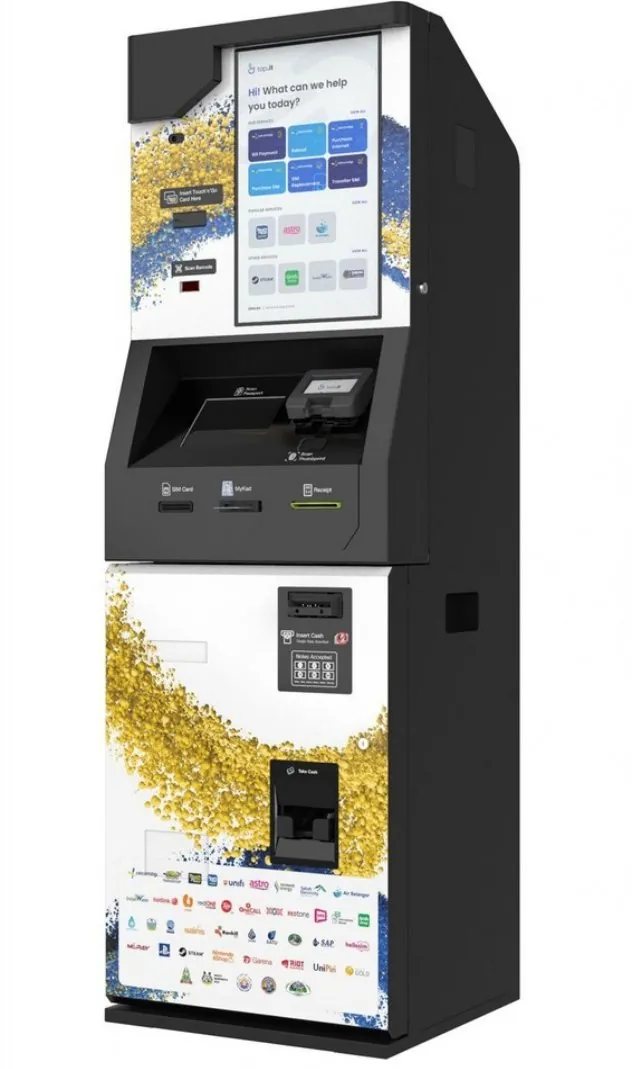
Tap.It's kiosk screen, in the company's own photos, greets customers with “Hi! What can we help you today?” and then offers the services the business behind it has switched on. Tap.It is customisable according to your business needs, so a kiosk in a retail store and one at a council counter do not have to show the same screen.
Customers serve themselves, from transactional to non transactional services, with no staff needed at the kiosk; the SSM tiles appear only on kiosks listed with SSM services.
SSM services · at kiosks listed with them
Services a business can switch on
- Bill, product and service paymentsSettle bills and pay for products and services.
- New registrationSign customers up at the kiosk.
- Information updatingCustomers keep their own details up to date.
- Food orderingOrders taken on the screen.
- Queue managementA queue number from the kiosk.
- Loyalty points collectionReward returning customers.
How do you pay at a Tap.It kiosk?
Tap.It kiosks take payment by cash, by credit or debit card, or by eWallet, on the kiosk itself. The same unit can settle a bill, take payment for a product or a service, or take a food order. A business that wants the kiosk to talk to its own systems can add API connectivity and payment integration through Safeguards KioskMedia's corporate solutions.
Which SSM services can you get at a Tap.It kiosk?
Tap.It kiosks listed with SSM services offer business renewal, compound payment and SSM4U activation. In SSM's own words: “SSM has appointed Safeguards Kioskmedia (M) Sdn Bhd as business renewal agent via Kiosk Tap.It.” (SSM4U Knowledge Hub) The renewal is made to SSM's Registrar and SSM issues the compound; the kiosk is a place to renew, pay and activate.
SSM fees at Tap.It kiosks
| Service | SSM’s fee | Kiosk fee |
|---|---|---|
| Renew a business registration (ROB) | RM60 a yeartrade nameRM30 a yearpersonal namePlus RM5 a year for each branch; renew 1 to 5 years at a time. | + RM3 |
| Pay an SSM compound | The compound amount, subject to approved service terms | + RM3 |
| Activate SSM4U | No charge | No charge |
SSM’s fees: SSM’s Table of Fees. Kiosk fee and SSM4U activation: Safeguards KioskMedia.
Where do you buy SSM documents?
You can buy SSM company and business documents online on SAFEDATA-SSM, the portal Safeguards KioskMedia runs as SSM's appointed Technology and Service Provider; the documents are sourced directly from SSM. Prices start at RM13.24 for a Company Profile, and a purchase takes four steps.
Tap.It and SAFEDATA-SSM fit together: renew your business at a Tap.It kiosk, then buy a supplier's Company Profile on SAFEDATA-SSM from your phone.
- Search
By company name or company registration number.
- Choose
Open the document list and pick each document as a CTC or non-CTC copy.
- Pay
Add the documents to the cart, check the total (SSM’s fee, the RM3.00 service fee and 8% SST) and pay by card, online banking or e-wallet.
- Download
From the “My Purchase(s)” menu. You can download it again within 7 days.
How can a business get a Tap.It kiosk?
A business takes Tap.It as KaaS, Kiosk as a Service, instead of buying the machine, and Safeguards KioskMedia handles the kiosk from the hardware to the operational support.
Industries Tap.It works with include retail, automotive, banking, councils, enforcement bodies, residential, commercial, F&B, education and manufacturing; the partnership page covers what a kiosk brings to your premises.
- Footprint
- 2′ × 2′
- Power
- One power point
- Hours
- 24 / 7 / 365Inside a store or office, a kiosk keeps that location’s hours.
- Capital cost
- No CAPEXA minimal annual OPEX allocation instead.
Put a kiosk in your space.
Talk to Safeguards KioskMedia about a Tap.It kiosk for your premises.
- 03-2935 9359